> For the complete documentation index, see [llms.txt](https://docs.guardianstack.ai/llms.txt). Markdown versions of documentation pages are available by appending `.md` to page URLs; this page is available as [Markdown](https://docs.guardianstack.ai/documentation/protect-your-implementation/employee-device-trust.md).
# Employee Device Trust
#### The Problem
When an employee gets phished, the attacker steals their credentials, and often walks right in. Traditional security layers fail at the one moment that matters most: the login from an unfamiliar device.
* **Schools:** Staff with access to student records, grades, and financial aid data
* **Construction:** Project managers with access to bids, contracts, and payroll systems
* **Healthcare:** Administrative staff accessing patient scheduling and billing portals
* **Logistics:** Dispatchers and warehouse staff using fleet management and inventory systems
* **Professional Services:** Accountants, lawyers, and consultants accessing client-sensitive portals
These organizations share a common vulnerability: **non-technical employees accessing sensitive web applications** who are prime phishing targets.
Here's why existing defenses fail when credentials are compromised:
| Defense | Why It Fails After Phishing |
| ------------------- | ------------------------------------------------------------------ |
| **Passwords** | Stolen directly — the attacker has the exact credentials |
| **SMS/Email MFA** | Intercepted by real-time phishing proxies (EvilGinx, Modlishka) |
| **TOTP Codes** | Captured in real-time by adversary-in-the-middle kits |
| **IP Allowlisting** | Attackers use residential proxies to match the victim's geo-region |
| **Session Cookies** | Stolen via phishing kits that harvest tokens post-authentication |
{% hint style="danger" %}
**The result:** An attacker with stolen credentials can log in from *any* device, and your application has no way to tell them apart from the real employee.
{% endhint %}
***
#### The Solution: Device Trust as a Security Layer
Guardian Stack's `visitorId` creates a persistent, tamper-resistant device identity for every browser that touches your internal applications. When an attacker phishes an employee's password and MFA token, there's one thing they **cannot steal: the device fingerprint**.
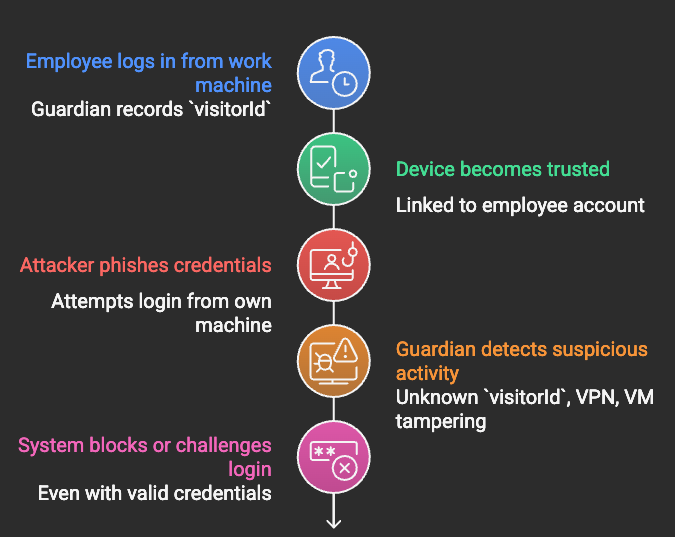
**How It Stops Phishing-Based Account Takeover**
1. Employee logs in from their work machine - Guardian silently records the device's `visitorId`
2. Device becomes **trusted** after initial verification, linked to the employee's account
3. Attacker phishes credentials and attempts to log in from their own machine
4. Guardian sees: **unknown `visitorId`**, VPN detected, possible VM or browser tampering
5. System **blocks or challenges** - even though the password and MFA token are valid
**What Guardian Detects on the Attacker's Device**
The attacker's environment almost always triggers multiple risk signals:
* **Unknown `visitorId`** - The device has never been seen before for this account
* **VPN detected** - Attackers route traffic through VPNs to mask their true location
* **Browser tampering** - Anti-detect browsers and spoofed user agents trigger tampering signals
* **Virtualization** - Many attackers operate from virtual machines to isolate their activity
* **Incognito mode** - Commonly used to avoid leaving traces
* **Privacy settings** - Aggressive fingerprint resistance configurations
{% hint style="info" %}
**Key insight:** Phishing steals *credentials*, not *devices*. Guardian Stack turns the device itself into an authentication factor that cannot be phished, forwarded, or replayed.
{% endhint %}
***
#### Implementation Guide
**Step 1: Frontend** - **Identify the Device on Every Login**
Install the Guardian JS SDK on your internal web application's login page:
```bash
npm install @guardianstack/guardian-js
```
Trigger identification when the employee submits their login form:
```typescript
import { loadAgent } from "@guardianstack/guardian-js";
// Initialize Guardian once when the login page loads
const guardian = await loadAgent({
siteKey: "YOUR_SITE_KEY",
});
// Capture device identity at login submission
async function handleLogin(email: string, password: string) {
// 1. Get the device fingerprint
const response = await guardian.get();
const requestId = response?.requestId;
// 2. Send credentials + device identity to your backend
const result = await fetch("/api/auth/login", {
method: "POST",
headers: { "Content-Type": "application/json" },
body: JSON.stringify({
email,
password,
guardianRequestId: requestId,
}),
});
return result.json();
}
```
**Step 2: Backend - Verify Device Trust Before Granting Access**
Install the Guardian Server SDK:
```bash
npm install @guardianstack/guardianjs-server
```
Create a login endpoint that evaluates device trust alongside credentials:
```typescript
import {
createGuardianClient,
isBot,
} from "@guardianstack/guardianjs-server";
const guardianClient = createGuardianClient({
secret: process.env.GUARDIAN_SECRET_KEY!,
});
app.post("/api/auth/login", async (req, res) => {
const { email, password, guardianRequestId } = req.body;
// 1. Validate credentials (your existing auth logic)
const user = await authenticateUser(email, password);
if (!user) {
return res.status(401).json({ error: "Invalid credentials" });
}
// 2. Fetch Guardian event for device intelligence
const event = await guardianClient.getEvent(guardianRequestId);
const visitorId = event.identification.visitorId;
// 3. Check for high-risk device signals
const deviceRisk = assessDeviceRisk(event);
// 4. Check if this device is trusted for this user
const trustedDevice = await db.trustedDevices.findFirst({
where: {
userId: user.id,
visitorId,
isActive: true,
},
});
// 5. Make access decision
if (deviceRisk.isHighRisk) {
// Block entirely — likely an attacker
await logSecurityEvent({
userId: user.id,
visitorId,
action: "LOGIN_BLOCKED",
reason: deviceRisk.reasons,
ip: event.ip,
});
return res.status(403).json({
error: "Access denied",
message: "This login attempt has been blocked for security reasons. "
+ "Contact your IT administrator if this was you.",
});
}
if (!trustedDevice) {
// Unknown device — require additional verification
const challenge = await createDeviceChallenge(user, visitorId);
return res.json({
requiresVerification: true,
challengeId: challenge.id,
methods: ["admin_approval", "email_verification"],
message: "New device detected. Additional verification required.",
});
}
// 6. Trusted device, no risk signals — grant access
await db.trustedDevices.update({
where: { id: trustedDevice.id },
data: { lastSeenAt: new Date() },
});
const token = generateSessionToken(user);
return res.json({ success: true, token });
});
```
**Step 3: Device Risk Assessment**
Build a risk scoring function using Guardian's detection signals:
```typescript
interface DeviceRisk {
isHighRisk: boolean;
isMediumRisk: boolean;
score: number; // 0–100
reasons: string[];
}
function assessDeviceRisk(event: GuardianEvent): DeviceRisk {
const reasons: string[] = [];
let score = 0;
// Bot detection — automated attack, block immediately
if (isBot(event)) {
reasons.push("Automated bot detected");
score += 50;
}
// Browser tampering — anti-detect browsers, spoofed fingerprints
if (event.tampering?.detected) {
reasons.push("Browser tampering detected");
score += 40;
}
// Virtual machine — attackers isolate activity in VMs
if (event.virtualization?.detected) {
reasons.push("Virtual machine detected");
score += 30;
}
// VPN — masking true location
if (event.vpn?.detected) {
reasons.push("VPN detected");
score += 20;
}
// Incognito mode — avoiding fingerprint persistence
if (event.incognito?.detected) {
reasons.push("Incognito mode detected");
score += 15;
}
// Privacy settings — aggressive anti-fingerprinting
if (event.privacySettings?.detected) {
reasons.push("Enhanced privacy settings detected");
score += 10;
}
return {
isHighRisk: score >= 50,
isMediumRisk: score >= 25 && score < 50,
score: Math.min(score, 100),
reasons,
};
}
```
**Step 4: Device Trust Enrollment**
When a new device passes verification, enroll it as trusted:
```typescript
app.post("/api/auth/verify-device", async (req, res) => {
const { challengeId, verificationCode, guardianRequestId } = req.body;
// 1. Validate the challenge
const challenge = await db.deviceChallenges.findUnique({
where: { id: challengeId },
});
if (!challenge || challenge.expiresAt < new Date()) {
return res.status(400).json({ error: "Challenge expired" });
}
// 2. Verify (email code, admin approval, etc.)
const isValid = await verifyChallenge(challenge, verificationCode);
if (!isValid) {
return res.status(401).json({ error: "Invalid verification" });
}
// 3. Fetch device identity
const event = await guardianClient.getEvent(guardianRequestId);
const visitorId = event.identification.visitorId;
// 4. Enroll the device as trusted
await db.trustedDevices.create({
data: {
userId: challenge.userId,
visitorId,
deviceName: deriveDeviceName(event), // e.g. "Chrome on Windows"
enrolledAt: new Date(),
enrolledBy: "email_verification",
lastSeenAt: new Date(),
isActive: true,
},
});
// 5. Grant access
const user = await db.users.findUnique({ where: { id: challenge.userId } });
const token = generateSessionToken(user);
return res.json({
success: true,
token,
message: "Device registered. You won't be asked again on this device.",
});
});
```
***
#### Real-World Examples
**School: Protecting Student Records**
**Scenario:** A school administrator's credentials are phished via a fake password reset email. The attacker tries to access the student information system to steal records.
```typescript
app.post("/api/auth/login", async (req, res) => {
const { email, password, guardianRequestId } = req.body;
const user = await authenticateUser(email, password);
if (!user) {
return res.status(401).json({ error: "Invalid credentials" });
}
const event = await guardianClient.getEvent(guardianRequestId);
const visitorId = event.identification.visitorId;
const deviceRisk = assessDeviceRisk(event);
// For roles with access to student PII, enforce strict device trust
const requiresStrictTrust = ["admin", "registrar", "counselor", "principal"]
.includes(user.role);
if (requiresStrictTrust) {
const trustedDevice = await db.trustedDevices.findFirst({
where: { userId: user.id, visitorId, isActive: true },
});
if (!trustedDevice) {
// Unknown device accessing student data — always challenge
await notifyITAdmin({
message: `New device login attempt for ${user.role}: ${user.email}`,
riskScore: deviceRisk.score,
reasons: deviceRisk.reasons,
});
return res.json({
requiresVerification: true,
message: "New device detected. IT admin has been notified for approval.",
});
}
if (deviceRisk.isMediumRisk || deviceRisk.isHighRisk) {
// Known device but exhibiting risk signals — possible compromise
await lockAccount(user.id, "Suspicious device signals on trusted device");
return res.status(403).json({
error: "Account locked",
message: "Unusual activity detected. Contact IT support.",
});
}
}
// Low-risk, trusted device — grant access
const token = generateSessionToken(user);
return res.json({ success: true, token });
});
```
**What happens when the attacker tries to log in:**
```
✅ Password: Correct (phished)
✅ MFA Token: Correct (intercepted by real-time proxy)
❌ Device: Unknown visitorId
❌ Environment: VPN detected, incognito mode
❌ Risk Score: 35+ → blocked
→ Login denied. IT admin notified. Account locked.
```
**Construction Company: Protecting Bid and Payroll Systems**
**Scenario:** A project manager's credentials are stolen via a spear-phishing email disguised as a subcontractor invoice. The attacker wants access to bid pricing and payroll data.
```typescript
// Middleware that runs on every request to sensitive internal tools
async function deviceTrustMiddleware(req, res, next) {
const { guardianRequestId } = req.headers;
const userId = req.session.userId;
if (!guardianRequestId) {
return res.status(400).json({ error: "Device verification required" });
}
const event = await guardianClient.getEvent(guardianRequestId);
const visitorId = event.identification.visitorId;
// Check device trust
const trustedDevice = await db.trustedDevices.findFirst({
where: { userId, visitorId, isActive: true },
});
if (!trustedDevice) {
return res.status(403).json({
error: "Unrecognized device",
message: "This device is not authorized. Contact your supervisor.",
});
}
// Continuous monitoring — check for mid-session anomalies
const deviceRisk = assessDeviceRisk(event);
if (deviceRisk.isHighRisk) {
// Session might be hijacked — terminate
await terminateSession(req.session.id);
await logSecurityEvent({
userId,
visitorId,
action: "SESSION_TERMINATED",
reason: "High-risk signals detected mid-session",
details: deviceRisk.reasons,
});
return res.status(403).json({
error: "Session terminated",
message: "Security anomaly detected. Please log in again.",
});
}
// Update last seen
await db.trustedDevices.update({
where: { id: trustedDevice.id },
data: { lastSeenAt: new Date() },
});
req.deviceTrust = { visitorId, risk: deviceRisk, device: trustedDevice };
next();
}
// Apply to all sensitive routes
app.use("/api/bids", deviceTrustMiddleware);
app.use("/api/payroll", deviceTrustMiddleware);
app.use("/api/contracts", deviceTrustMiddleware);
```
**Role-Based Device Policies**
**Scenario:** Different employee roles require different levels of device trust enforcement.
```typescript
interface DevicePolicy {
requireTrustedDevice: boolean;
allowMediumRisk: boolean;
maxDevicesPerUser: number;
deviceTrustExpiryDays: number;
requireAdminApproval: boolean;
}
const DEVICE_POLICIES: Record = {
// Executives and finance — strictest controls
executive: {
requireTrustedDevice: true,
allowMediumRisk: false,
maxDevicesPerUser: 2,
deviceTrustExpiryDays: 30,
requireAdminApproval: true,
},
// Staff with access to sensitive records
staff_sensitive: {
requireTrustedDevice: true,
allowMediumRisk: false,
maxDevicesPerUser: 3,
deviceTrustExpiryDays: 60,
requireAdminApproval: true,
},
// General staff
staff_general: {
requireTrustedDevice: true,
allowMediumRisk: true,
maxDevicesPerUser: 5,
deviceTrustExpiryDays: 90,
requireAdminApproval: false,
},
// Contractors and temporary workers
contractor: {
requireTrustedDevice: true,
allowMediumRisk: false,
maxDevicesPerUser: 1,
deviceTrustExpiryDays: 14,
requireAdminApproval: true,
},
};
async function enforceDevicePolicy(
user: User,
visitorId: string,
deviceRisk: DeviceRisk
): Promise<{ allowed: boolean; reason?: string }> {
const policy = DEVICE_POLICIES[user.role] || DEVICE_POLICIES.staff_general;
// Check device trust
if (policy.requireTrustedDevice) {
const trustedDevice = await db.trustedDevices.findFirst({
where: {
userId: user.id,
visitorId,
isActive: true,
lastSeenAt: {
gte: subDays(new Date(), policy.deviceTrustExpiryDays),
},
},
});
if (!trustedDevice) {
return {
allowed: false,
reason: "Device not trusted or trust has expired",
};
}
}
// Check risk tolerance
if (!policy.allowMediumRisk && deviceRisk.isMediumRisk) {
return {
allowed: false,
reason: "Medium-risk signals not allowed for this role",
};
}
if (deviceRisk.isHighRisk) {
return { allowed: false, reason: "High-risk device signals detected" };
}
return { allowed: true };
}
```
**IT Admin Dashboard: Device Fleet Visibility**
**Scenario:** IT admin needs to see all trusted devices across the organization, revoke compromised devices, and monitor login anomalies.
```typescript
// Get all trusted devices for the organization
app.get("/api/admin/devices", async (req, res) => {
const devices = await db.trustedDevices.findMany({
include: { user: { select: { email: true, role: true, name: true } } },
orderBy: { lastSeenAt: "desc" },
});
return res.json({ devices });
});
// Revoke a specific device (e.g. lost laptop, terminated employee)
app.post("/api/admin/devices/revoke", async (req, res) => {
const { deviceId, reason } = req.body;
const device = await db.trustedDevices.update({
where: { id: deviceId },
data: {
isActive: false,
revokedAt: new Date(),
revokedReason: reason,
},
});
// Terminate any active sessions from this device
await db.sessions.deleteMany({
where: { userId: device.userId, visitorId: device.visitorId },
});
await logSecurityEvent({
userId: device.userId,
visitorId: device.visitorId,
action: "DEVICE_REVOKED",
reason,
performedBy: req.session.userId,
});
return res.json({ success: true });
});
// Revoke all devices for a user (employee termination or compromise)
app.post("/api/admin/devices/revoke-all", async (req, res) => {
const { userId, reason } = req.body;
await db.trustedDevices.updateMany({
where: { userId, isActive: true },
data: {
isActive: false,
revokedAt: new Date(),
revokedReason: reason,
},
});
// Kill all sessions
await db.sessions.deleteMany({ where: { userId } });
return res.json({ success: true });
});
// Get security events log
app.get("/api/admin/security-log", async (req, res) => {
const events = await db.securityEvents.findMany({
where: {
createdAt: { gte: subDays(new Date(), 30) },
},
include: { user: { select: { email: true, name: true } } },
orderBy: { createdAt: "desc" },
take: 500,
});
return res.json({ events });
});
```
***
#### Database Schema
```sql
-- Trusted devices linked to employee accounts
CREATE TABLE trusted_devices (
id UUID PRIMARY KEY DEFAULT gen_random_uuid(),
user_id UUID NOT NULL REFERENCES users(id) ON DELETE CASCADE,
visitor_id VARCHAR(255) NOT NULL,
device_name VARCHAR(255), -- e.g. "Chrome on Windows"
enrolled_at TIMESTAMP DEFAULT NOW(),
enrolled_by VARCHAR(50), -- "email_verification", "admin_approval"
last_seen_at TIMESTAMP DEFAULT NOW(),
is_active BOOLEAN DEFAULT true,
revoked_at TIMESTAMP,
revoked_reason TEXT,
UNIQUE(user_id, visitor_id)
);
CREATE INDEX idx_trusted_devices_user
ON trusted_devices(user_id, is_active);
CREATE INDEX idx_trusted_devices_visitor
ON trusted_devices(visitor_id);
-- Device verification challenges
CREATE TABLE device_challenges (
id UUID PRIMARY KEY DEFAULT gen_random_uuid(),
user_id UUID NOT NULL REFERENCES users(id),
visitor_id VARCHAR(255) NOT NULL,
challenge_type VARCHAR(50) NOT NULL, -- "email", "admin_approval"
verification_code VARCHAR(255),
status VARCHAR(20) DEFAULT 'pending', -- "pending", "approved", "denied", "expired"
created_at TIMESTAMP DEFAULT NOW(),
expires_at TIMESTAMP NOT NULL,
resolved_at TIMESTAMP,
resolved_by UUID -- admin who approved/denied
);
CREATE INDEX idx_device_challenges_status
ON device_challenges(user_id, status);
-- Security event log (audit trail)
CREATE TABLE security_events (
id UUID PRIMARY KEY DEFAULT gen_random_uuid(),
user_id UUID REFERENCES users(id),
visitor_id VARCHAR(255),
action VARCHAR(50) NOT NULL, -- "LOGIN_BLOCKED", "DEVICE_REVOKED", etc.
reason TEXT[],
risk_score INTEGER,
ip_address INET,
metadata JSONB,
performed_by UUID, -- for admin actions
created_at TIMESTAMP DEFAULT NOW()
);
CREATE INDEX idx_security_events_user
ON security_events(user_id, created_at DESC);
CREATE INDEX idx_security_events_action
ON security_events(action, created_at DESC);
```
***
#### Deployment Patterns
**Pattern 1: Login-Only Protection (Quick Start)**
Add device trust checks only at the login endpoint. This is the fastest way to protect against phished credentials with minimal code changes.
**Best for:** Organizations that want immediate protection without modifying their entire application.
```typescript
// Add to your existing login handler — no other changes needed
const event = await guardianClient.getEvent(guardianRequestId);
const visitorId = event.identification.visitorId;
const deviceRisk = assessDeviceRisk(event);
const trustedDevice = await db.trustedDevices.findFirst({
where: { userId: user.id, visitorId, isActive: true },
});
if (deviceRisk.isHighRisk || !trustedDevice) {
// Challenge or block
}
```
**Pattern 2: Continuous Session Monitoring**
Re-verify device identity on every sensitive action, not just at login. This catches session hijacking and stolen session tokens.
**Best for:** Organizations with high-value data (student records, financial systems, healthcare).
```typescript
// Middleware on every API request
app.use("/api/sensitive/*", async (req, res, next) => {
const event = await guardianClient.getEvent(req.headers["x-guardian-request-id"]);
const deviceRisk = assessDeviceRisk(event);
if (deviceRisk.isHighRisk) {
await terminateSession(req.session.id);
return res.status(403).json({ error: "Session terminated" });
}
next();
});
```
**Pattern 3: Tiered Access Based on Device Trust**
Allow login from any device, but restrict what data the user can access based on device trust level.
**Best for:** Organizations where employees sometimes need to access systems from personal or shared devices.
```typescript
app.get("/api/data/:resource", async (req, res) => {
const event = await guardianClient.getEvent(req.headers["x-guardian-request-id"]);
const visitorId = event.identification.visitorId;
const trustedDevice = await db.trustedDevices.findFirst({
where: { userId: req.user.id, visitorId, isActive: true },
});
const accessLevel = trustedDevice ? "full" : "limited";
if (accessLevel === "limited") {
// Allow viewing, but not exporting or modifying
return res.json({
data: await getReadOnlyView(req.params.resource),
accessLevel: "limited",
message: "Full access requires a trusted device.",
});
}
return res.json({
data: await getFullAccess(req.params.resource),
accessLevel: "full",
});
});
```
***
#### How This Stops Real Attack Scenarios
**Scenario 1: Real-Time Phishing Proxy (EvilGinx)**
The attacker sets up a phishing page that proxies requests to your real login page in real-time, capturing both the password and the MFA token as the employee enters them.
**Without Guardian:** Attacker replays the captured session cookie and gets full access.
**With Guardian:** The proxied session has the *employee's* `visitorId` (since the browser was the employee's). But when the attacker uses the stolen session cookie from their own browser, Guardian sees a completely different `visitorId`. The session is invalidated.
**Scenario 2: Credential Stuffing from Breached Databases**
The attacker obtains employee credentials from a third-party data breach (password reuse) and attempts to log in via automated scripts.
**Without Guardian:** If the password works, the attacker gets in.
**With Guardian:** Bot detection fires (automated script), `visitorId` is unknown, likely VPN and VM signals. Login blocked immediately.
**Scenario 3: Insider Sharing Credentials**
An employee shares their login with an unauthorized person (e.g., a subcontractor logging into a system they shouldn't have access to).
**Without Guardian:** The unauthorized person logs in successfully.
**With Guardian:** The unauthorized person's device has a different `visitorId`. They're prompted for device verification, and IT admin is notified of a new device enrollment attempt.
***
#### Best Practices
**Do**
* **Enroll devices during onboarding** — When an employee first sets up their account, register their primary work device as trusted
* **Set expiration policies** — Require re-verification every 30–90 days based on role sensitivity
* **Monitor continuously** — Don't just check at login; verify device trust on sensitive actions
* **Alert IT admins** — Automatically notify when high-risk logins are blocked or new devices are detected
* **Log everything** — Maintain a full audit trail of device enrollments, revocations, and blocked attempts
* **Revoke on termination** — Include device trust revocation in your employee offboarding checklist
**Don't**
* **Don't replace MFA** — Guardian is an additional layer, not a replacement for multi-factor authentication
* **Don't trust VPN signals alone** — Some legitimate employees use VPNs; combine signals for risk scoring
* **Don't block immediately on medium risk** — Challenge first, block only on high-risk combinations
* **Don't forget shared devices** — Kiosks and shared workstations need different policies (tie trust to the device, not the user)
* **Don't expose visitorId to employees** — Keep device identity server-side only
***
#### Conclusion
Phishing is the #1 attack vector for a reason — it works. Passwords get stolen. MFA tokens get intercepted. Session cookies get hijacked. But the one thing an attacker cannot steal through a phishing email is the employee's physical device.
Guardian Stack's device trust layer gives you:
* **Phishing resilience** — Stolen credentials are useless without the trusted device
* **Zero friction for employees** — Recognition is silent; trusted devices log in normally
* **Visibility for IT** — See every device accessing your systems, revoke instantly
* **Role-based enforcement** — Stricter policies for sensitive roles, flexible for general staff
* **Audit trail** — Complete log of every device enrollment, login attempt, and security event
The key insight: **Identity is not just who you are — it's what device you're on.** By making the device an authentication factor, you close the gap that phishing exploits.
***
{% hint style="success" %}
**Get Started:** [Sign up for Guardian Stack](https://dashboard.guardianstack.ai/) and start protecting your employee access today.
{% endhint %}
---
# Agent Instructions
This documentation is published with GitBook. GitBook is the documentation platform designed so that both humans and AI agents can read, navigate, and reason over technical content effectively. Learn more at gitbook.com.
## Querying This Documentation
If you need additional information that is not directly available in this page, you can query the documentation by asking a question.
Perform an HTTP GET request on the following URL with the `ask` and `goal` query parameters:
```
GET https://docs.guardianstack.ai/documentation/protect-your-implementation/employee-device-trust.md?ask=&goal=
```
`ask` is the immediate question: it should be specific, self-contained, and written in natural language.
`goal` is what the user is ultimately trying to achieve, the reason they need the answer. Sharing it helps GitBook give you a better, more relevant answer. A goal is most helpful when it describes the outcome the user wants rather than restating the question. For example, with `ask=how do I create an API token`, a goal like `automate deployments from our CI pipeline` lets GitBook tailor the answer to that use case.
The response will contain a direct answer to the question and relevant excerpts and sources from the documentation.
Use this mechanism when the answer is not explicitly present in the current page, you need clarification or additional context, or you want to retrieve related documentation sections.